


Advertisement

-
STOPzilla!

Install STOPzilla! And Be Secure.
STOPzilla successfully detects, blocks, and removes Spyware, Adware, Pop-up ads, Phishing attacks, hijackers, rootkits, Trojans, bots, drive-by downloads, rogue programs, messenger service ads, keyloggers, malicious BHOs, dialers, and much more.
STOPzilla’s user interface is a convenient 'console' from which you can access all major settings, features, and tools. STOPzilla has been specifically designed to perform effectively regardless of the user’s level of computer expertise.
Click here to Download
more

-
avast! Virus Definitions 4.x

avast! 4 Home Edition is a free complete ICSA certified antivirus software for home noncommercial use.
avast! obtained VB100% awards in 2002/3 Virus Bulletin comparative reviews under Windows XP Pro and under Windows 2000 Advanced Server.
avast! Home Edition includes the following components:
■ On Demand Scanner - with Skinnable Simple Interface - just select what do you want to scan in which way and press the Play button.
■ On Access Scanner - resident scanning of all files being opened, read and written and behavior blocker monitoring dangerous actions of viruses.
■ E-mail scanner easily integrates with most mail clients and it checks both incoming and outgoing mails, it provides heuristic analysis of mail content to protect against new Worms.
■ Boot Time Scanner - scans disks in the same way and in the same time as Windows CHKDSK does (on NT/2000/XP only).
■ Explorer Scanner - right click on the object allows you to scan it.
■ Screen Saver Scanner - integrates with your Screen Saver to scan PC during your coffee breaks.
■ Virus Chest - safety isolated folder to store infected, suspicious and even some system files - to restore them.
Protect your system and valuable data against computer viruses with Avast! Home Edition.
Our true incremental updates are based on iAVS technology and they are available for virus definition file update and for program upgrade.
You can download and install updates by simple clicking on the iAVS icon, it can be checked and done automatically when you are On-line.
The update files of size under 100 KB are available at least twice a week and within couple of hours in the case of emergency of new virus. They are automatically downloaded, installed and loaded to avast! without restart or logoff.Requirements:
· For a computer with Windows 95/98/Me: PC 486, 32 MB RAM, 50 MB of free hard disk space
· For a computer with Windows NT 4.0: PC 486, 32 MB RAM, 50 MB of free hard disk space, Service Pack 3 or higher installed
· For a computer with Windows 2000/XP: PC Pentium, 64 MB RAM (128 MB recommended), 50 MB of free hard disk space
· For a computer with Windows Vista: PC Pentium 4, 512 MB RAM, 50 MB of free hard disk space
· The program itself requires 20 MB, the rest is reserved for the virus recovery database file and its index. [VRDB, also known as the "integrity database" from the previous version]What's New in This Release:
· improvements in some unpackers (WinExec, Installer, ZIP)
· improved memory scan, especially under 64-bit operating systems
· fixed a possible deadlock condition when copying system files from some removable media
· fixed a possible problem with access rights when deleting infected files on reboot
· Web Shield: minor stability fixes
· Internet Mail: smtp.gmail.com and smtp.live.com now ignored on port 25 (as these are SSL only)
· improved healing of some infected files
· various fixes and improvements in the scanning engine
· Web Shield now scans pages compressed with the "deflate" algorithm
· performance optimization of Standard Shield under Windows Vista
· improvements in the automatic sample submission system
· improvements in the URL blockerTo Download click here
more

-
CA Anti-Spyware 2009 11.0.0.241:

Spyware can steal your personal data, switch your home page, re-direct your web searches, display annoying ads, and slow your PC to a crawl.
The CA Anti-Spyware application was designed to protect against a wide range of spyware threats that can expose your confidential information and diminish your PC's performance.Here are some key features of "CA Anti-Spyware 2009":
· Detects and removes spyware in real time
· Stays current via automatic updates
· Helps prevent theft of personal data
· Improves PC performance
· User-Friendly Interface offers simplicity and superior ease-of-use, helping you quickly and easily set preferences, check program status, and maintain a secure PC
· Low System Overhead with a total install of only 35 MB and low usage of system resources, CA Anti-Spyware installs quickly, saves hard drive space, and scans efficiently
· Secure Now provides proactive protection by monitoring critical program functions and settings, and reminding you to keep your security at an optimal level
· Continuous Protection to keep your computer protected from the latest internet risks by automatically renewing your subscription at the then current renewal price (plus applicable tax), so you don't have to (for more information, click here)
· Comprehensive Spyware Detection and Removal provides comprehensive protection against a wide range of spyware, adware, keyloggers, browser hijackers and other threats
· Real-time Protection detects and removes spyware running in memory, and helps prevent spyware from making malicious changes to the Registry
· Frequent Automatic Updates help ensure you're protected against the latest threats
· Detailed Scan Results show the specific threat level of any spyware found, and allow you to link to the CA Spyware Information Center for more details
· Scheduled and On-Demand Scanning allow you to run a scan at any time, or schedule scans at pre-selected intervals to meet your needs
· Custom Scans allow you to select specific drives, files and folders to scan
· File Exclusion List allows you to exclude specific files and folders from scans
· Threat Outbreak Warning System provides real-time content feeds from the CA Security Advisor, giving you detailed, up-to-the-minute information on the most recent and most prevalent spyware threats
· Quick Tips provide you with helpful, at-your-fingertips answers to commonly asked questions, easing the burden of searching the Help file or contacting Support for assistance
· Supported by the CA Security Advisor Team our worldwide research labs work 24 x 7 to detect threats before they can damage your PC, helping ensure protection from the latest threatsRequirements:
· 256 MB RAM (512 MB for Windows Vista)
· 300 MHz or higher processor (800 MHz for Windows Vista)
· Microsoft Internet Explorer 5.5 or higher (7.0 for Windows Vista)
· 35 MB hard disk space
· CD-ROM driveTo Download click here
more

-
Panda USB Vaccine 1.0.0.19 Beta:
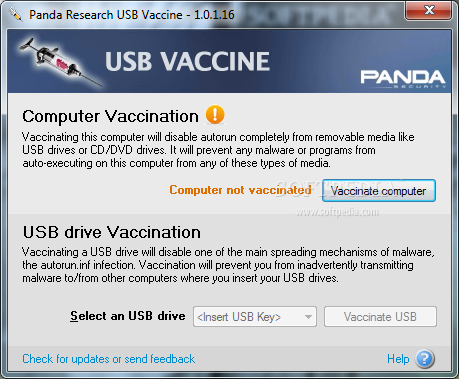
The Panda USB Vaccine allows users to vaccinate their PCs in order to disable AutoRun completely so that no program from any USB/CD/DVD drive (regardless of whether they have been previously vaccinated or not) can auto-execute.
The Panda USB Vaccine also can be used on individual USB drives to disable its AUTORUN.INF file in order to prevent malware infections from spreading automatically. When applied on a USB drive, the vaccine permanently blocks the AUTORUN.INF file, preventing it from being read, created, deleted or modified.
Once applied it effectively disables Windows from automatically executing any malicious file that might be stored in that particular USB drive. The drive can otherwise be used normally and files (even malware) copied to/from it, but they will be prevented from opening automatically.
Please take into account that vaccinating a USB drive is a non reversible operation and under some very unlikely conditions some applications could stop working. In any case if you do not have an AUTORUN.INF file in your USB drive it’s completely safe to vaccinate it.
With Panda USB Vaccine you'll be safe from any malware attacks exploiting the AUTORUN.INF file.
To down load click here
more
-
Spyware Doctor 6.0.1.441 Final
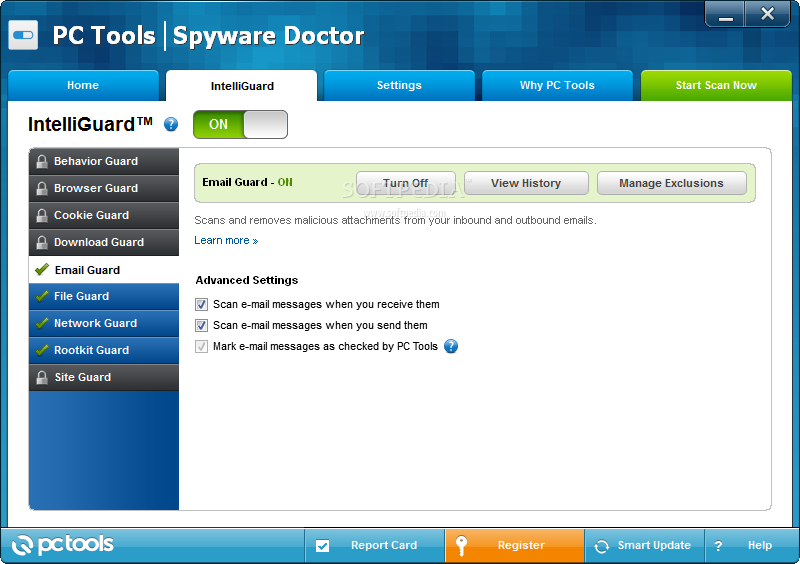
Spyware Doctor is an advanced adware and spyware removal program that will detect and clean thousands of potential spyware, ad ware, keyloggers, trojans, spy ware cookies, trackware, spybots and other malware from your computer.
Spyware Doctor is a multi-award winning spyware removal utility that detects, removes and protects your PC from thousands of potential spyware, adware, trojans, keyloggers, spybots and tracking threats.
The Spyware Doctor remover tool allows you to remove, ignore or quarantine identified Spyware for free in the trial version. It also has an OnGuard system to immunize and protect your system against hundreds of privacy threats as you work.
By performing a fast detection at Windows start-up you will be alerted with a list of the potential threats identified.Here are some key features of "Spyware Doctor":
· Detects and removes malware infections including spyware, adware, browser hijackers, Trojans, keyloggers, dialers and tracking cookies
· Frequent Smart Updates to detect and guard against new infections as well as adding enhancements to Spyware Doctor
· Rootkit scanning
· Spider Scanning Technology (patent pending)
· ADS detection & removal capability
· Malicious KL (Kernel Level) Process killer
· A wide range of other sophisticated scanning tools
· The OnGuard feature, designed for continual protection against malware infections and associated activities on your computer
· Ability to quarantine and restore items that have been detectedLimitations:
· Download the latest version of Spyware Doctor and scan your PC for thousands of spyware, adware, and malware threats. Please note the trial version is limited to scan only.What's New in This Release:
· A new OnGuard real-time protection tool, IM Guard, protects users of Instant Messaging applications such as MSN Messenger from access to any potentially malicious URLs received. Such URLs can lead to phishing sites or sites which attempt to exploit your web browser.
· Some recent malware infections are installed as drivers which protect themselves from removal and along with other installed drivers, are protected from deletion by the operating system. However, Spyware Doctor has the capability of removing these malicious driver threats. Spyware Doctor is also capable of removing threats that attempt to shut down the Spyware Doctor application itself.
· The Ignore List is used to prevent Spyware Doctor from detecting specific items that you wish to keep. However, some recent threats have been found to add themselves to the Ignore List in an attempt to compromise Spyware Doctor�s detection capabilities. Therefore, the security of the Ignore List has been enhanced and integrity checks imp...To Download click here
more
-
McAfee VirusScan 13.3.117

With the wide variety of viruses, hackers and blended threats lurking on the Internet today, you need more than a simple anti-virus program to keep your PC and files secure. McAfee VirusScan Plus AntiVirus, Firewall & AntiSpyware provides the essential protection you need to surf the Web and download files safely.
With McAfee VirusScan Plus powerful integrated technologies work together to combat and defeat even the most sophisticated multi-pronged attacks. McAfee's trusted PC protection blocks and removes threats automatically, and identifies spyware and adware before they can run on your PC.
Plus, to keep things extra simple, the new McAfee SecurityCenter gives you at-a-glance control over all your McAfee applications. Get the confidence you need to surf the Web, knowing McAfee is always on, always updating and always protecting you.Here are some key features of "McAfee VirusScan":
3 in 1 Protection:
· Stops Viruses. Automatically blocks, cleans, and removes viruses so you can surf the Web safely and download files.
· Blocks Spyware. Blocks spyware before it installs on your computer and removes existing spyware so you can surf the Web safely.
· Stops Hackers. Protects and conceals your computer from hackers so you can surf the Internet safely.
Additional Benefits:
· Guards important files stored on your computer, and helps prevent your computer from crashing.
· Automatically monitors incoming and outgoing Internet activity, looking for suspicious applications and data.
· Improves your computer's performance by removing clutter and freeing disk space.
· Provides advance warning to help you avoid sites which send spam, install adware, or attempt online scams.
· Redesigned for You. Scan your computer, check for updates and configure your security settings using the new McAfee SecurityCenter. This essential, easy-to-use program gives you one-click access to your computers security information.
· Always On, Always Protecting. 24/7 virus and threat protection from McAfee AVERT Labs continuously monitors worldwide virus activities and provides immediate, anti-virus protection and removal solutions.
· Always Upgrading, Always Updating. Daily updates are installed automatically. When a new version of McAfee is available, you get it automatically at no charge during your subscription, ensuring that you always have up-to-date protection.
· Convenient, Ongoing Protection. McAfee offers a variety of renewal options to keep your McAfee protection current.
· Real People, Real Help. Support from McAfee's computer security experts, via Internet chat, e-mail and phone.
New and Improved Features:
· Integrated anti-virus, anti-spyware and firewall technologies work together to combat today's sophisticated, multi-pronged attacks.
· Spyware protection detects, blocks, and removes spyware and adware.
· Complete inbound and outbound firewall protection automatically trusts known good applications and helps blocks spyware, Trojans, and key loggers.
· McAfee SystemGuards watches your computer for specific behaviors that may signal virus, spyware, or hacker activity.
· McAfee X-Ray for Windows detects and kills rootkits and other malicious applications that hide from Windows and other anti-virus programs.
· McAfee SiteAdvisor adds safety ratings to sites and search engine results based on comprehensive spam, adware, and online scam safety tests.
· Stealth mode can hide your presence on the Internet, making your computer invisible to hackers.
· McAfee SecurityCenter makes it simple to review your computer's security status, check for updates, and fix potential security issueRequirements:
· 75 MB hard disk space (after installation; 125 MB hard disk space before installation) 800 X 600 or higher resolution
· Supported browser programs (Microsoft Internet Explorer 6.0 or later / Mozilla Firefox 1.5 or later)
· Supported e-mail programs: POP3 (Outlook Express, Outlook, Eudora, Netscape)
· Supported instant messaging programs (AOL Instant Messenger 2.1 or later / Yahoo Messenger 4.1 or later / Microsoft Windows Messenger 3.6 or later / MSN Messenger 6.0 or later)To download click here
more

-
BitDefender Free Edition 2009 Build 12.0.12.0

BitDefender Free Edition is your chance to use one of the world's most effective antivirus engines for free.
BitDefender Free Edition uses the same ICSA Labs certified scanning engines found in other BitDefender products, allowing you to enjoy basic virus protection for no cost at all.
BitDefender Free Edition is an on-demand virus scanner, which is best used in a system recovery or forensics role. If you are on an "always-on" Internet connection, we strongly advise you to consider using a more complex antivirus solution.
NOTE: One year free license.Here are some key features of "BitDefender Free Edition":
· Antivirus
· The mission of the Antivirus module is to ensure detection and removal of all viruses in the wild. BitDefender Antivirus uses robust scan engines, certified by ICSA Labs, Virus Bulletin, Checkmark, CheckVir and T?V.
· IMPROVED Proactive detection
· B-HAVE (Behavioral Heuristic Analyzer in Virtual Environments) emulates
· a virtual computer-inside-a-computer where pieces of software are run in order to check for potential malware behavior. This BitDefender proprietary technology represents a new security layer that keeps the operating system safe from unknown viruses by detecting malicious pieces of code for which signatures have not been released yet.
· Spyware scanning and cleaning
· BitDefender can scan your system, or part of it, for known spyware threats. The scan uses a constantly updated spyware signature database.
· NEW Privacy protection
· The privacy guard monitors HTTP (web) and SMTP (mail) traffic flowing out of your computer for what might be personal information ? like credit card numbers, SSN's and other user-defined strings, like, for example, bits of passwords.
· IMPROVED Deployment and use
· A setup wizard starts immediately after installation, helping users select the most appropriate update settings, a scanning schedule and providing a quick path to registering and activating the product.
· IMPROVED User Experience
· BitDefender redesigned the user experience, placing emphasis on ease of use and clutter avoidance. As a result, many BitDefender v10 modules require significantly less user interaction, through judicious use of automation and machine learning.
· Hourly Updates
· Your copy of BitDefender will be updated 24 times a day over the Internet, directly or through a Proxy Server. The product is able to repair itself if necessary, by downloading the damaged or missing files from BitDefender servers. BitDefender license owners benefit from free virus definition updates and free product upgrades.
· NEW Rootkit Detection and Removal
· A new BitDefender module looks for rootkits (malicious programs designed to control victim computers, while staying hidden) and removes them on detection.Requirements:
· Pentium MMX 200 Mhz or higher processor
· Minimum 64MB of RAM Memory (128MB recommended)
· Minimum 40MB available hard disk spaceTo Download click here
more

-
Avira AntiVir Professional 9.0.0.713


Avira AntiVir Windows Professional was designed to be a comprehensive, easy to use antivirus program, that will offer reliable virus protection to business users worldwide.
NOTE:
You must obtain a test license in order to test the appllication.Here are some key features of "Avira AntiVir Professional":
· Control Center for monitoring, administering and controlling the entire program
· Central configuration with user-friendly standard and advanced options and context-sensitive help
· Scanner (On-Demand Scan) with profile-controlled and configurable search for all known types of virus and malware
· Integration into the Windows Vista User Account Control allows you to carry out tasks requiring administrator rights
· Guard (On-Access Scan) for continuous monitoring of all file access attempts
· MailGuard (POP3 scanner and SMTP scanner) for the permanent checking of emails for viruses and malware. Checking of email attachments is included
· WebGuard for monitoring data and files transferred from the Internet using the HTTP protocol (monitoring of ports 80, 8080, 3128)
· Integrated quarantine management to isolate and process suspicious files
· Rootkit protection for detecting hidden malware installed in your computer system (rootkits)
· (Only for 32-bit systems)
· Direct access to detailed information on the detected viruses and malware via the Internet
· Simple and quick updates to the program, virus definitions, and search engine through Single File Update and incremental VDF updates via a webserver on the Internet or an intranet
· User-friendly licensing in License Manager
· Integrated Scheduler to plan one-off or recurring tasks, such as updates or test runs
· Extremely high virus and malware detection via innovative scanning technology (scan engine) including heuristic scanning method
· Detection of all conventional archive types including detection of nested archives and smart extension detection
· High-performance multithreading function (simultaneous high-speed scanning of multiple files)Requirements:
· At least 192 MB RAM (Windows XP or Professional)
· At least 512 MB RAM (Windows Vista)
· 40 MB + quarantine
· 100 MB (temporary)Limitations:
· 30 days trial licenseWhat's New in This Release:
· Version 8 offers: integrated WebGuard, an enhanced interface, a modularized AV-search engine for improved scan performance, AntiBot and AntiDrive-by and a new module: Rescue Systems.To Download click here
more


-
AVG Free Edition

A free antivirus tool for protection against computer viruses
AVG Free Edition is the well-known anti-virus protection tool. AVG Free is available free-of-charge to home users for the life of the product! Rapid virus database updates are available for the lifetime of AVG Free Edition, providing a high-level of detection capability that millions of users around the world trust to protect their PCs. AVG Free is easy-to-use and will not slow your system down (low system resource requirements)
Here are some key features of "AVG Free Edition":
· Automatic update functionality· The AVG Resident Shield, which provides real-time protection as files are opened and programs are run
· The AVG E-mail Scanner, which protects your e-mail· The AVG On-Demand Scanner, which allows the user to perform scheduled and manual tests
· Free Virus Database Updates for the lifetime of the product
· AVG Virus Vault for safe handling of infected files
· Great customer satisfaction!· Please note that any previous version of AVG Free will be un-installed automatically during the installation of the new AVG Free.
Limitations:
· AVG Free Edition is available free-of-charge to home users! AVG Free Edition is for private, non-commercial, single home computer use only. Use of AVG Free Edition within any organization or for commercial purposes is strictly prohibited.
· AVG Free cannot be installed on server operating systems (such as Windows Server 2003), nor can it be used for the scanning of network drives· Scheduling options in the AVG Free Edition are very limited (only one scheduled update per day, one scheduled scan per day etc.)
· AVG Free Edition does not offer advanced testing options, such as automatic healing, password-protected archives reporting, adjustment of scan process priority and many others.
Improvements :
· Small improvements in installation process.· Improvements in Resident Shield scanning.
Fixed Bugs :
· Fixed problem with missing help in Rescue Disk Wizard (Windows 98 and ME only).
· Fixed problem with displaying Resident Shield notification windows in some cases.
· Fixed wrong saving of proxy_host value in advanced AntiSpam settings.
· Fixed problem with default Resident Shield extension list settings after installation.
· Fixed problem with cleaning files with read-only attribute.To Download click Here
more

-
Kaspersky Virus Removal Tool 7.0.0.290

To Download click here
The Kaspersky Virus Removal Tool application was designed to be another virus scanner and detection software from Kaspersky. The produst will scan the specified locations for any virus threats and remove them or send to Quarantine folder.
more

-
Norton AntiVirus 2009 Gaming Edition

Winning Protection that won’t slow you down
The Norton AntiVirus 2009 Gaming Edition application was designed to be the fastest virus protection you can get. It stops spyware, worms, bots, and other threats cold—without slowing down your PC. When you’re gaming, your protection should get out of the way. Norton AntiVirus 2009Gaming Edition does exactly that.
Gamer Mode
No alerts + no notifications = no interruptions Optional settings to temporarily suspend updates, behavioral scanning and intrusion prevention Enabled automatically when your PC is in full screen mode Activate manually with a quick click on the Norton system tray icon.
Lightning Fast
Rapid Pulse Updates every 5 to 15 minutes Installs in less than a minute Adds less than 1 second to boot time
Light as a Feather
Uses less than 6MB memory even without the Gamer Mode performance boost Needs less than 50MB hard disk space on installation Runs only 2 processes at a time Performance graphs display CPU and memory usage and how little Norton is using
Respects your needs
Smart Scheduler holds resource intensive actions for when you are not using your PC Resource usage table shows you the what, when and how long for background actions taken by Norton AntiVirus Delivers consistently strong protection - that’s why Norton AntiVirus has won more consecutive Virus Bulletin 100 awards than any other AV software
Here are some key features of "Norton AntiVirus 2009 Gaming Edition":
Lightning Fast and Light as a Feather:
· Fastest and lightest virus, spyware, and rootkit protection available, optimized for gaming.
· Installs in under one minute on average.
· Requires less than 6 MB of memory—eight times less memory than the competitive industry average.
· Opens only two processes.
· Uses less than 50 MB of hard disk space (without definitions).· Adds less than 3 seconds to boot time.
· Norton Insight technology scans only those files at risk, resulting in fewer, shorter, and faster scans of less than 35 seconds on average—almost five times faster than the competitive industry average.
Gamer Mode:
· Suspends alerts and notifications to avoid interrupting game play.
· Option to suspend real-time monitoring activities and updates to reduce PC and network resource usage even further.
· Automatically enabled when PC is in full-screen mode.
· Turn it on manually with a simple click on the Norton system tray icon.
Protection:
· Automatically detects and removes the latest online threats.· Tiny, rapid Pulse Updates every 5 to 15 minutes—30 times more often than the competitive industry average.
· Norton Protection System delivers multilayered protection.· Patent-pending, industry-leading protection from Web-based attacks.
· Real-time SONAR (Symantec Online Network for Advanced Response) technology detects emerging spyware and viruses before traditional definitions are even available.
· Botnet detection prevents bots from taking control of your PC.
. Norton Recovery Tool boots and repairs badly infected PCs.· Specialized deep-cleaning technology delivers our most complete scan possible.
· Easy access to intelligence on Internet threats targeting gamers.· Control Without Disruptions
· Smart Scheduler automatically schedules non time-critical activities such as scans and updates to occur while your PC is idle.
· Comprehensive control gives you the option to customize your security settings.
· Review the security status of every process on your PC.
Product Support:
· Free tech support and online knowledge base deliver the help you need, however you need it.
· Information for Gamers links directly to gaming related security information and more.
Requirements:
· 300 MHz or faster processor
· 256 MB of RAM (512 MB RAM required for the Recovery Tool)
· 150 MB of available hard disk space.
To Download click hereTo buy the full version click here
more


